
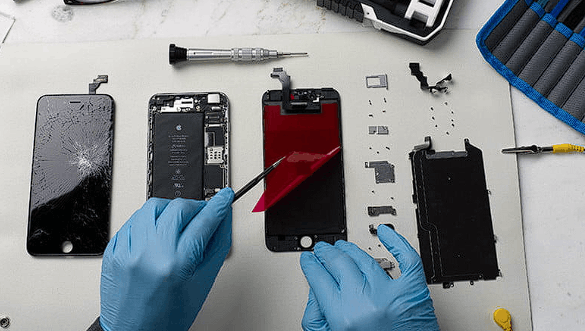
Yeah, that’s the uncomfortable question most buyers skip. And I get it—refurbished gadgets look like a smart money move until something starts glitching two weeks later. I’ve been there, checking specs like everything is fine, only to realize later the “deal” had hidden cracks.
So here’s how I actually approach checking quality, without guessing or hoping.
First, I look at refurbishment grading, because not all “refurbished” means the same thing. Sellers love vague labels. I don’t.
- Grade A (Excellent): Near-new condition, minimal wear
- Grade B (Good): Light scratches, fully functional
- Grade C (Fair): Visible wear, still works but looks rough
Simple labels, but they hide a lot. The real question is what parts were replaced, not just how it looks.
Now, I inspect hardware integrity like I’m testing a used car, not a shiny phone.
- Battery health (below 85% = warning sign)
- Screen uniformity (look for color patches or flicker)
- Ports (loose charging port = future headache)
- Speaker and mic clarity (small crackles matter)
A device can look clean and still be technically tired. That’s the trick.
Let’s be real, I’ve seen “refurbished” laptops with brand-new shells but old, overheating motherboards inside. That’s where people get fooled—cosmetics vs core components.
Comparison Table: Certified vs Non-Certified Refurbished
| Feature | Certified Refurbished | Non-Certified Reseller |
|---|---|---|
| Testing process | Multi-point inspection | Often basic checks |
| Warranty | Usually 6–12 months | Limited or none |
| Parts replaced | OEM or verified parts | Unknown quality parts |
| Risk level | Lower | Higher |
You can already see the gap. Certification isn’t just a label—it’s accountability.
Next, I always check seller transparency. If I can’t find answers quickly, I walk away.
- Do they list replaced parts clearly?
- Is there a return policy (at least 7–14 days)?
- Do they show real device photos instead of stock images?
If those answers are missing, I assume risk is hidden too.
Expert Tip: I personally cross-check serial numbers on manufacturer websites whenever possible. It takes 2 minutes and often reveals whether a device was originally sold as retail, refurbished, or replaced under warranty.
Another thing people ignore is software condition. A clean reset is fine, but outdated firmware or leftover enterprise locks (MDM profiles) can ruin usability fast.
- Check for activation lock (especially Apple devices)
- Ensure OS updates install normally
- Look for strange pre-installed apps
Truth be told, software issues are where “cheap deals” turn expensive fast.
Finally, I always test under pressure, not idle use. I run apps, camera, multitasking—because weak devices don’t fail while sitting still. They fail when stressed.
That’s the first layer of checking quality.
You might assume the outside tells the truth. It doesn’t. Not even close.
Inside a refurbished gadget is where the real story sits, and that’s where I focus next—because cosmetics can lie all day, but hardware won’t pretend under pressure.
Start with battery diagnostics, since this is usually the first weak point.
A worn battery doesn’t always scream “bad,” it whispers through performance drops and random shutdowns.
- Check cycle count (laptops and phones both expose this in settings or tools)
- Watch for sudden percentage jumps (90% → 70% instantly is a red flag)
- Test charging speed consistency over 15–20 minutes
If I see instability, I don’t negotiate. I walk.
Next comes internal hardware stress testing, and this is where most buyers never go far enough.
I run devices like they’re going to work for me, not sit on a table looking pretty.
- Open multiple apps at once
- Push camera + video recording together
- Run benchmark apps or system diagnostics
- Heat check after 10–15 minutes of load
A healthy refurbished device should stay predictable. Not silent perfection, just stable behavior under strain.
Let’s be real, overheating tells you more truth than any seller description ever will.
Pro vs Cons: Refurbished Device Testing Depth
Pro (Good Signs):
- Stable performance under load
- Battery holds charge consistently
- No sudden shutdowns or lag spikes
- Clean IMEI/serial verification
- Genuine parts confirmed
Cons (Red Flags):
- Random lag under light use
- Device heats too fast
- Battery percentage jumps unpredictably
- Serial number mismatch
- Unknown repair history
I treat these like warning lights on a dashboard. One or two issues? Maybe repairable. Three or more? It’s usually a money trap.
Another layer people skip is IMEI and serial verification, which is surprisingly powerful.
Every legitimate device has a traceable identity. If that identity looks altered or doesn’t match manufacturer records, something has been replaced or tampered with.
- Cross-check IMEI on official manufacturer sites
- Confirm warranty status still exists or is reset properly
- Match box, device, and system serial numbers
If they don’t align, I don’t debate it. I just leave.
Now comes the subtle part: screen and sensor calibration testing.
This is where low-grade refurbishing often hides.
- Swipe test across full screen for dead zones
- Check brightness uniformity in dark and bright rooms
- Test proximity sensor during calls
- Rotate device to confirm gyroscope response
These issues don’t always show up immediately. They creep in later, which is why I test aggressively upfront.
Expert Tip: I always use a white and gray background image when testing screens. Dead pixels and color tint issues show up faster that way than with normal apps.
Another thing I check is repair authenticity. Not all replacements are equal.
- OEM parts (best case)
- Grade-A third-party parts (acceptable)
- Unknown aftermarket parts (risk zone)
Truth be told, a refurbished gadget is only as good as its weakest replaced component, not the overall label it carries.
And here’s something most people miss: seller behavior patterns.
If answers are vague, rushed, or overly confident without technical detail, that’s often a signal. Real refurbishers usually know exact specs, not just marketing phrases.
I also look for hesitation around warranty explanations. That pause matters more than people think.
We’re still not done yet. There’s a final layer involving scam detection patterns, deep software locks, and long-term reliability checks that most buyers never hear about.
Now we move into the part most people never think about until it’s too late: hidden locks, repair history fraud, and long-term failure patterns.
This is where refurbished devices either prove themselves or quietly fall apart after a few weeks of normal use.
First, I always check for software locks that aren’t obvious at first glance.
Some devices look fully reset but still carry restrictions underneath.
- MDM (Mobile Device Management) profiles on phones and laptops
- iCloud or Google account remnants
- Carrier locks that reappear after updates
- “Activation required” loops after reboot
These aren’t cosmetic issues. They can completely brick usability. A device can function perfectly today and lock itself tomorrow after a system update.
That’s the kind of surprise nobody wants.
Next, I look at repair trace patterns, because refurbished units often pass through multiple hands.
A clean-looking phone might actually be a patchwork of parts from different devices.
- Screws with mismatched wear levels
- Slight gaps between frame and screen
- Different color temperatures on replacement displays
- Non-uniform vibration motor feel
These are small signals, but together they tell a louder story.
I usually press around the frame lightly. If it creaks or flexes unevenly, that’s a sign of rushed assembly.
Checklist: Deep Refurbished Quality Scan
- ✔ IMEI/serial numbers match everywhere
- ✔ No hidden account locks remain
- ✔ Device passes full factory reset cleanly
- ✔ Hardware responds consistently under stress
- ✔ No overheating during multitasking
- ✔ Battery drains evenly, not in sudden drops
- ✔ Physical assembly feels tight and uniform
Miss even two of these, and risk starts climbing fast.
Now let’s talk about long-term reliability patterns, which is where experience really matters.
Refurbished devices don’t usually fail immediately. They degrade in predictable stages.
- Week 1–2: Everything feels normal
- Week 3–6: Battery inconsistency appears
- Month 2–4: Heating or lag under load
- Month 4+: Random component failures (camera, mic, ports)
I’ve seen this cycle enough times to treat it like a timeline, not a possibility.
Expert Tip: I always run a “stress repetition test”—same action repeated 50–100 times (camera open/close, app switching, charging cycles). Weak devices expose themselves through inconsistency, not single failures.
Another thing worth watching is firmware update behavior.
A healthy refurbished gadget should:
- Install updates without errors
- Reboot normally after updates
- Maintain performance after patching
If updates cause lag spikes or feature glitches, the internal hardware/software balance is already unstable.
Let’s be real, this is where many “cheap deals” slowly turn into expensive replacements.
Finally, I check resale transparency signals from the seller side.
If a seller avoids giving:
- Exact repair history
- Parts replacement details
- Testing methodology
- Or warranty conditions in writing
…I treat that as incomplete information, not negotiation room.
Because real refurbishing work is documented. Guesswork is not.
At this stage, you’re not just inspecting a gadget anymore—you’re reconstructing its life story from fragments.
And that’s the difference between a safe purchase and a regret that shows up every time the screen turns on.